Buy anything from 5,000+ international stores. One checkout price. No surprise fees. Join 2M+ shoppers on Desertcart.
Desertcart purchases this item on your behalf and handles shipping, customs, and support to Czech Republic.
🌐 Plug in. Power up. Stay ahead of the curve.
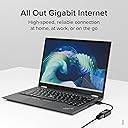
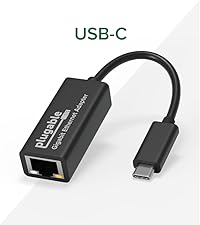
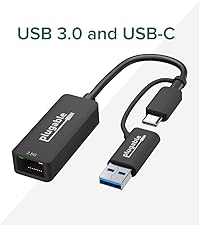
The Plugable USB 3.0 to Gigabit Ethernet Adapter delivers ultra-fast 1 Gbps wired connectivity with broad OS compatibility including Windows 11, macOS (Big Sur to Sequoia), Linux, Chrome OS, and Nintendo Switch. Featuring the reliable ASIX AX88179A chipset, it offers plug-and-play convenience with automatic driver installation and advanced networking features like jumbo frames and VLAN tagging. Designed for professionals and home offices alike, it ensures stable, lag-free connections backed by lifetime North American support.


| ASIN | B00AQM8586 |
| Best Sellers Rank | #81 in USB Computer Network Adapters |
| Brand | Plugable |
| Built-In Media | Network adapter |
| Color | Black |
| Compatible Devices | Macbook Pro 13" / 14" / 15", 16", MacBook Air, MacBook Retina, MacBook M1 / M2 / M3 / M4, HP Spectre x360 / Pavilion / Envy, Dell XPS / Precision / Latitude, Lenovo ThinkPad / IdeaPad / Yoga / Flex, Surface Pro 7 / 7+ / 8 / 9, Surface Laptop 3 / 4 / 5 / Go / Go 2 / Studio / SE, LG Gram, Acer Aspire / Swift / Spin, ASUS Zenbook / Vivobook, Most Windows systems with Windows 10 or newer, Most Chromebooks running ChromeOS 100 or newer Compatible Devices Macbook Pro 13" / 14" / 15", 16", MacBook Air, MacBook Retina, MacBook M1 / M2 / M3 / M4, HP Spectre x360 / Pavilion / Envy, Dell XPS / Precision / Latitude, Lenovo ThinkPad / IdeaPad / Yoga / Flex, Surface Pro 7 / 7+ / 8 / 9, Surface Laptop 3 / 4 / 5 / Go / Go 2 / Studio / SE, LG Gram, Acer Aspire / Swift / Spin, ASUS Zenbook / Vivobook, Most Windows systems with Windows 10 or newer, Most Chromebooks running ChromeOS 100 or newer See more |
| Compatible Operating System Family | ChromeOS, Linux, MacOS, Windows |
| Customer Reviews | 4.6 out of 5 stars 4,868 Reviews |
| Data Link Protocol | Gigabit Ethernet |
| Data Transfer Rate | 1 Gigabits Per Second |
| Global Trade Identification Number | 00649241924524 |
| Hardware Interface | USB 3.0 Type A |
| Item Dimensions L x W x H | 7.28"L x 4.53"W x 0.98"H |
| Item Type Name | Plugable Network Adapter, Black (USB3-E1000) |
| Item Weight | 0.9 Ounces |
| Manufacturer | Plugable |
| Mfr Part Number | USB3-E1000 |
| Minimum Required Operating System Version | Windows XP |
| Model Number | USB3-E1000 |
| Product Dimensions | 7.28"L x 4.53"W x 0.98"H |
| UPC | 649241924524 |
| Unit Count | 1.0 Count |
| Warranty Description | 2 Year Limited Parts and Labor |
T**E
Confirmed: ASIX Electronics AX88179 Chipset
Adapter: Plugable USB 3.0 to Gigabit Ethernet Adapter Chipset: ASIX AX88179 (confirmed via lsusb on Linux) Tested On: Linux (Fedora 42 Xfce Spin): Plug-and-play. Windows 11: Untested. macOS: Untested. Performance: Negotiates at full 1000 Mb/s (1 Gbps) speed on linux. On Nintendo Switch you are limited to Fast Ethernet limits, so 100 Mbps theoretical max probably less due to overhead. Realistically you will probably see around 80 Mbps down and 29 Mbps up max. This is due to the Nintendo limiting the USB bandwidth the device can realistically use. No way around this except to use a different chipset to offload some of the performance limiting factors off the Switch and onto the adapter. An Adapter using the ASIX AX88179B chipset is probably your best chance to get around these limitations. Pros: Works on PC and Nintendo Switch. Notes: USB 3.0 is required for full Gigabit performance. Avoid plugging into USB 2.0 ports if you want max throughput. Not a driverless model like the newer AX88179B or AX88772E, but still widely supported Verdict: Great cross-platform USB NIC for anyone who wants a stable, fast Ethernet connection via USB. Highly recommended for Linux users thanks to built-in kernel support, and equally easy on Windows.
D**S
Works with Nvidia Shield
Nvidia Shield network port went out, found this model on Reddit as many stated it worked on my 2017 Nvidia Shield. I ordered it plugged it in and after rebooting twice the network port was working. Always use hardwire if I can as wireless not always stable.
A**R
USB Ethernet port
Was as advertised.. works as a substitute for no Ethernet port.. does seem to work slower but works
K**M
Confirmed works with Roku stream devices
Works with my Roku Streambar Pro (9101R2), which is actually a little less powerful than my other Roku Ultra (4670X, also tested and works). This is model USB3-E1000, which comes with the ASIX AX88179A chipset. Officially, Roku says only the older USB2-E100 with the ASIX AX88772 chipset is supported, but this newer USB 3.0 version appears 100% compatible as well. It appears anything 2020 or newer should work with the USB3-E1000. The activity/link lights are BRIGHT for a bedroom or home theater but remedied with some model paint; Sharpie wasn't enough to tame these LEDs. As you can see in the pic, the YouTube 4K60 test footage is pulling a sustained transfer rate and no buffer issues. With the Roku on just wifi I was occasionally having a problem with buffering with 4K on YT and Netflix which has been resolved.
S**Y
Easy set up with Windows 10
I'm using Windows 10 on a new Dell XPS i7 computer. The first day I set this up it worked like a charm. Since then, I had connectivity issues. First I found out that someone had messed with my cable and removed it from the router. Now I need to trouble shoot the cable because I believe the end that was removed was also damaged. I share a service with other roommates in a small community and the wifi is weak through the metal walls of my room, so I decided to hard wire everything. Since my new computer doesn't have an rj45 input I had to go USB connection and I purchased this item. Windows 10 already had the driver, so hook up was easy. There are other similar products out there, but I wanted a USB 3.0 connection. I still recommend this product despite the cable issues I'm having.
D**0
Great little gadget!
This solved my laptop internet speed issue. My 7 year-old laptop wasn’t getting the Gig speed I just signed up for. It is attached to a Plugable UD-3900 USB 3.0 universal docking station which I have had for 9 years. When I upped my internet speed to Gig level, the laptop wasn’t getting near that speed. Even though the docking station was purchased a while ago, Plugable tech support helped me troubleshoot. It took a few emails over a few days and some testing on my part, but a solution (this adapter) was able to be recommended. It worked like a charm. That old laptop is flying. I highly recommend the Plugable products. Their products work really well and you won’t find better support.
W**Y
Works With ChromeOS
Let me say up front that I do not anticipate using this adapter very much. I have a DSL modem with integrated WiFi router, so don't have much need for wired Ethernet. However, occasionally I do need to connect to the router directly. My desktop computer is off in a distant room and I use a Chromebook (which does not have an Ethernet port) around the house, so recently when I needed to connect to the router's Ethernet port I had to go find and then fire up my seldom-used Windows laptop to do the job. Quite by coincidence I read a discussion of Ethernet adapters on a Chromebook Google Community recently and noted that the Plugable brand was recommended by several users. The price looked good and the specs specifically stated that Linux and ChromeOS are supported, so I ordered one. Even before I received the adapter with two-day Prime shipping I got an email from Plugable with support information and thanking me for my purchase. Well done Plugable! Upon receipt the first thing I noticed was how easy it was to open the packaging, which is the plastic clam shell type, but with a simple tab closure rather than the sealed edges that require either a knife or scissors to open. I opened my Chromebook, turned off WiFi, cabled up the adapter and plugged it in to a USB port and I was immediately on line. I ran a speed test and everything checked out just fine. I've added the Plugable to my collection of adapters (USB C to A, USB C to HDMI, HDMI to VGA, etc.) and know that it will do the job when next it is needed.
A**A
Works great overall. Certain Ethernet connectors without small grooves in the connector may or may not latch.
Theoretically, it can't get much simpler than this. It's an ethernet adapter that wires through a USB 3.0 connector. Overall this particular product from Plugable seems to work well and as advertised, though it's got some questionable quality in regard to the actual ethernet port itself. The port doesn't seem to allow the necessitated spacing for the ethernet cable connector itself to actually snap into place in the port. I simply have to shove the connector into the port with this device and hope and pray that it stays held in there. If I even so much as knock the USB hub I have it hooked up to that wires into my laptop, I risk the cable connector falling out of the port and rendering the whole system as "not connected to the internet." I have to then reach back to my cable area and reattach the ethernet cable itself to the port. This shouldn't be an issue with an ethernet port as it should allow a cable connector to latch into the port, securing the connection and ensuring stuff like this isn't a problem. EDIT: Upon more closely analyzing this product, it appears as though the Ethernet port on the product seems to support a specific type of Ethernet connector. I had been using an ethernet connector jack that doesn't seem to feature two small grooves on the piece of the clip of the connector that typically juts out from an Ethernet connector. The adapter seems to properly snap in and hold the Ethernet connector and the thereby the whole cable if the connector features these two small grooves on the pin of the connector; otherwise if your Ethernet connector doesn't feature two small grooves on the piece of the pin, you may need to switch to a connector that features this small detail, otherwise I have not had success in properly snapping into place any connector that doesn't feature these two small grooves on the connector's pin piece. To purchasers, check your actual Ethernet connector itself before assuming there is an issue with the adapter unit itself.
Trustpilot
2 weeks ago
1 week ago