


Desertcart purchases this item on your behalf and handles shipping, customs, and support to Czech Republic.
🎨 Elevate your art game with precision, clarity, and color that commands attention!
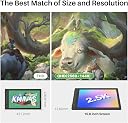
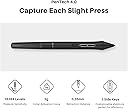
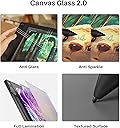
The HUION KAMVAS 16 (Gen 3) is a professional-grade 15.8-inch drawing tablet featuring a 2.5K QHD display with 186 PPI, delivering sharp visuals and ultra-accurate color reproduction (99% sRGB, 90% Adobe RGB). Equipped with PenTech 4.0, it offers 16,384 levels of pen pressure sensitivity and ±60° tilt support for natural, lag-free drawing. Its nano-etched anti-glare glass provides a durable, paper-like texture, minimizing parallax. Dual customizable dials and shortcut keys streamline your creative workflow. Compatible with Windows, Mac, Linux, and Android devices, it connects via USB-C and HDMI for a clutter-free setup. Ideal for artists seeking a premium Wacom alternative with robust support and exceptional value.





| ASIN | B09FDZG55G |
| Active Surface Area | 54.2 square inches |
| Additional Features | 16K Pen Pressure, 2.5K QHD Resolution, Canvas Glass 2.0, Dual Dials, PenTech 4.0 |
| Best Sellers Rank | #27 in Computer Graphics Tablets |
| Brand | HUION |
| Built-In Media | Cleaning Cloth, Full-featured USB-C cable, 3-in-1 Cable, USB Extension Cable, USB Power cable, Power Adapter, Glove, PW600L Pen, Pen Holder, Pen Nibs x 10, Quick Start Guide, Stand |
| Color | Silvery |
| Compatible Devices | Desktop, Laptop, Smartphone, Tablet |
| Connectivity Technology | 3-in-1 HDMI, Full-featured USB-C |
| Customer Reviews | 4.5 out of 5 stars 4,403 Reviews |
| Display Type | LCD |
| Item Dimensions L x W | 16.58"L x 9.32"W |
| Item Type Name | Computer Graphics Tablets |
| Item Weight | 2.7 pounds |
| Manufacturer | ShenZhen Huion Animation Technology Co., LTD |
| Mfr Part Number | GT1602 |
| Model Name | Kamvas 16 (Gen 3) |
| Model Number | GS1563 |
| Native Resolution | 2560x1440 |
| Number of Items | 1 |
| Number of Packs | 1 |
| Operating System | Android(USB3.1 DP1.2 or later), Linux OS(Ubuntu 20.04 LTS), Mac OS 10.12 or later, Windows 10 or later Operating System Android(USB3.1 DP1.2 or later), Linux OS(Ubuntu 20.04 LTS), Mac OS 10.12 or later, Windows 10 or later See more |
| Pressure Sensitivity | 16384 levels |
| Screen Size | 15.8 inches |
| Special Feature | 16K Pen Pressure, 2.5K QHD Resolution, Canvas Glass 2.0, Dual Dials, PenTech 4.0 |
| Specific Uses For Product | Animation, Drawing, Painting |
| Target Audience | Artist, Student, Teacher |
| Unit Count | 1 Count |
| Warranty Description | 1 year warranty |
B**Y
Great Starter Drawing Tablet w/Awesome Support
I dont write reviews for many if any products I buy. I purchased this tablet a little less than a year ago and it has been working pefectly. Screen: Very good construction this tablet is sturdy with a solid metal back with no flex whatsoever. The screen has a paper like feel when drawing which I like it has an etched glass instead of a film over the screen which is important to me so I don't have to worry about replacing the film if it gets damaged or worn out. The screen is also laminated sot the parallax from pen to to screen is minimal 5/5 Pen: The pen is decent it does tilt I don't use that feature much but its workable and it does go edge to edge. Pro tip for those having issues with the cursor not syncing up to the pen, make sure you run the calibration tool and for some reason Windows sets the screen to 150% scale which messes up the pen and it doesn't track correctly. Change the screen resolution back to 100% and the pen and tablet work fine. I like a little more heft to my writing utensils this pen is a little light, but it work very good and I can draw line quickly and easily with no lag. The pen has 2 programmable buttons as well. 4/5 Usability: The tablet has 6 macro buttons and a slider which are useful and I use a lot some people prefer the buttons others prefer to use their laptop keyboard. I find the screen size to be very good and even though its at 1080 P I don't see individual pixels when working with the tablet which on bigger screen can become annoying unless you go 4K. The biggest problem I have is the power button is located too close to the macro buttons and I had to train myself not to shut off the tablet in mid draw. They should move that. I don't like the all in one cord solution either they came with I fear that if it breaks I will need to buy one from Huion if they sell them separately. 3.5/5 Support: I never thought I would write a glowing review about the support I received from a Chinese company with their product. The tablet I received was working perfectly until 2 weeks ago and the screen went white on half of the tablet. I had a little over a month from their 1 year warranty and I didn't expect it to get foxed or replace and was all set to purchase a different tablet from a different company. However I thought with nothing else to lose why not give their warranty a shot. I sent pics and a video of the issue to HUION support and within 2 days they sent me an email after looking at my video of the problem that they were going to replace my product all I need to do is pay $50 for shipping. $50 is a lot better than $300 plus so I went for it. I received a replacement tablet yesterday and hooked it up. It came from Amazon in original product box with all the cords, pen and accessories that come with a new tablet. The support was in constant contact with me through the whole process and I am impressed. Honestly I wouldn't expect that much from a company in the United States with a defective product let a lone one from China. 5/5 TLDR: Very Good Wacom alternative for half the price and awesome support. Some minor gripes here and there but honestly for the price I paid and the support I received I cant complain.
A**E
Better than the Wacom One [no shade]
Bought this on October 2024, after my Wacome One became unusable after its charger port fused into one with itself nearly 1 year after purchase. I was worried that after purchasing the Kamvas Pro 16 I would have the same issue with the charger port. But alas after nearly 2 years of use, this has not occurred. So yes, this is a good purchase for your money if your looking for a decent drawing tablet. Sturdy with respectable care. The pen doesnt need charging. Only needs calibration once in a while through the huion program. Setting up the program and getting the screen to sync can be difficult initially but as long as you use that somewhat questionable techy experience you will figure it out my friend. Compared to the Wacome One, the Huion Kamvas Pro 16 has bigger screen. It has more to offer yet has a familiar feel and in addition it was more durable.
S**D
Pretty happy so far!
I've been drawing with it for a few days now. Considering the drastic failure of the XP Pen I purchased ( which had defective hardware and had to be returned ) i'm pretty happy with it so far. First the cons The screen has a decent amount of glare even though its matte. Not distracting enough to make it impossible to work but it's noticeable with an overhead light. There seems to be driver or firmware issues with the Dial that comes with it. The UI pops up behind other apps and sometimes on the wrong screen. Still trying to work that issue out. There is a noticeable amount of space between the pen tip and the tablet. Again, not unusable but I notice it. Pros It came packaged nicely and was easy to get out and set up. ( the XP pen packaging was like a TV, with Styrofoam and you had to pull it out of the box and everything with in a plastic bag. It was a pain to repackage to send back ). This tablet came in a suitcase type box. I opened it up, pulled it out and all the cables where ready to go (not all individually wrapped). The driver was easy to install and it worked right away. The only thing I had to do was set it to use the tablet screen because at first it was set up to use my computer monitor so when I touched the pen to the tablet it moved the cursor on my monitor. Easy fix. The screen has a nice texture to draw on. It doesn't quite feel like paper but its an upgrade from my Ipad which felt like drawing on glass. So far drawing on it has been fun with no major issues. Setting up the Dial was easy enough. I work in Clip Studio. After I took the time to set up my shortcuts it all went smoothly. All in all i'm happy with the purchase and it feels great to transition from my i pad workflow.
L**V
Could have come with directions. Otherwise, seems quality. Difficult start up.
4/5 Stars. The setup is strange. Simply plugging the Kamvas in doesn't necessarily work. The screen briefly flashes on. Shows "no signal" and goes dark. What do you do about this? I have no idea. No directions were in the package. You've got a jumble of cable options. One is for power. This is clearly marked, but doesn't seem to use any of the power connectors I have. Plugging it into the PC does work. Great, it has power but why? I bought this to be liberated from the PC. Annoyed. Manufactures universally don't seem to make screen protectors for Huion NOR Wacom. Be prepared for such laziness. You can get some that fit over the drawing area. So, I guess that's something? I'm going to attempt to set this up again in a few days, but honestly it's more bothersome than it really needed to be. No real reason to have to jump through so many hoops to arrive at the same thing that was in the box out the door. I suspect the issues are these. When you get the box, if it comes with directions, you'd have a better time with things. The box is actually good quality and the device itself is nice to handle. Good chords, stand, and all that. It looks like it will work once I figure out how to actually turn it on. That's another thing... clicking the power button doesn't lead to the screen coming on yet. VERY DISTRESSING! Once you figure out how to get power to the thing (no outlet power connector is supplied so use the PC for now?) you will see the no signal message. This at least shows it works? I guess? I hope. Afterwards you need to most likely get some app for it. This seems to be what Youtube recommends, but people are skipping steps. They don't show the whole process for getting the device working. Overall... a bit mystified to mildly worried. Got this in mid November. It's late November now. I'm being that gentle with it because I have no idea what I'm supposed to be doing to get this to work. And it's a tad bit expensive. Anyway, I'll update the review if I figure out whether or not this one is a dud. At present it just looks like zero directions = no idea how to set it up. And youtube isn't a good source of information.
Z**.
A perfect size and tech upgrade
I had a kamvas 16 before this. Which was my intro to pen displays and huion as a brand. I loved it. As I progressed in my career I needed more screen size. That was my main need. I wasn’t prepared for what I was missing! The screen texture and quality is so much better since it’s glass (textured) you get better precision and the friction is spot on. The new pen tech lets me get so much out of each psd brush! I love the mood lighting and the stand ergonomics. Very sturdy. If you’re torn between this version or the older 24 in, get this. 22 is plenty big for photoshop or as a second monitor. I also have the huion mini keyboard thing with psd keys programmed for a faster animation workflow.
A**O
Amazing tablet
I bought this as a gift for my daughter for Christmas but now that’s she’s used it for a while I and I’ve gotten to play with it; Ican say that it’s awesome. Setting it up was extremely easy even with our 4 year old laptop. We have to use the dual wire for it to be compatible which can be annoying because the plugs are on opposite sides but once the tablet it connected you can just use it to maneuver the screen and programs. I love that it came with so many accessories and wires. I bought one from Wacom and had to return because you have to buy extra wires for it to be compatible. But the kamvas came with a lot of options. The screen is so crisp and beautiful. The pen is very comfortable to hold. Would definitely recommend
J**T
Easy to use right away
I am a decent artist with pencil and paper, or paint, or whatever medium... but never tried digital art before. Since I do graphic design work and am familar with the adobe suite of software, I've been curious about trying to take my art digital too. After just a couple weeks I was producing things that were just as good if not a little better than my hand drawn art. This was really easy to set up, and I was working nearly right away although there are still a lot of things I need to learn to be quicker with. This can only come with more time and practice and is not the fault of the tablet. Things I like: Pen does not need to be charged. The tablet is not a touch screen but is only activated by the pen. I thought I would hate this but I actually have come to love it because I can rest my hands on the screen and not worry about accidentally wrecking something Feels like natural drawing in every way. The one thing I don't like? All the cords. I knew going in there would be cords, but I hate cords. But that's life right? I find I accidentally click the pen buttons way more than I should. They are positioned to be easy to get to and I guess I find them too easy to get to. NOTE: You NEED TO HAVE a separate computer to hook up to this tablet. It is not a stand-alone You NEED to run software that is compatible with the tablet. No software comes with the tablet. The following software works with this tablet: Krita, Gimp, Photoshop (Krita and Gimp are both open source and free for you to download and use) There are probably more than that, those are just the ones I've tried. You will need to download drivers to get the tablet to work on your computer, this information is given in the box. HELPFUL HINTS: If you are a complete newbie to tablets or digital art, I advise learning to use layers. This will help you be able to go back and edit parts of your drawings without disturbing areas around it.
A**R
Virtually no support and very poor setup instructions
This seemed like the perfect product based on reviews and videos. I purchased it for my wife who is mostly house bound and loves the time she spends drawing on her laptop. She had been having some issues on the laptop and I thought this would be a good alternative if she continued having those issues. It turned out to be a nightmare instead. Her laptop, a two year old Microsoft Surface Studio Pro, started tracking the stylus incorrectly. My first attempt to getting the HUION to work on the laptop met with limited success. The HUION connected to the laptop but there was no display. There is no HDMI output on the laptop so USB was the only choice. Submitting a support request went unanswered for weeks until yesterday (but more on that later). After watching numerous videos I found one thing that looked promising, A USB docking station with an HDMI output. More money invested and that did not work either. My next attempt was on my Widows PC, a high end gamer I built a few months ago. The USB connection did not work on this either and more videos uncovered the reason why. It seems that if the PC has discrete video the HUION needs to be connected to one of the HDMI ports on that video card. Doing this still only got it to partially work but the display was not rendered correctly on the HUION. My third and final attempt was on my wife's desktop also with a discrete video card. This was the most successful attempt but also was not rendering properly with the stylus touching the HUION in a different place than the PC monitor displayed. More videos and I discovered the HUION needed to be configured as a monitor using Windows setup and not the HUION drivers and software. Once configured through Windows The HUION actually worked properly EXCEPT while drawing a line it would disappear while drawing. Another support request from HUION with no response. Yesterday after weeks of issues and time spent on youtube I finally got a response to my support requests. Their recommendation was to check their support site and get back to them if I still had an issue and they would get back to me as soon as possible. Here is their complete response for both the support requests I submitted. You will notice at the end there is a disclaimer that the response is an automated message. Perhaps their computer was down. "We sincerely apologize for the delay in responding to your ticket. We're currently experiencing a higher-than-usual volume of requests, which has unfortunately impacted our response times. We understand this is frustrating, and we're truly sorry for any inconvenience this has caused. Your issue is important to us. Before we proceed, you might be able to find a solution by checking our support articles at Huion Support Solutions. We have many helpful resources that may resolve your problem quickly. If you've checked our support site and still require assistance, please reply to this email, and we'll get back to you as soon as possible. If your issue is resolved, no further action is needed. Thank you for your patience and understanding. We appreciate your business and look forward to assisting you further if needed. Best Regards, The Huion Customer Support Team Disclaimer: This is an automated message." So I'm stuck with a tablet that does not work properly that I purchased from a company that could care less about providing support and I'm out hundreds of dollars and many hours of time spent looking for solutions.
A**R
Dobre feature'y, słaba jakość.
Mój egzemplarz miał martwe piksele, a długopis dosłownie trzeszczał i potrafił samemu aktywować przycisk. Firmware też posiadał bugi, np. podczas pracy z Clip Studio Paint.
C**O
Gran producto
Valió la pena cada centímo invertido, es muy buena y la sensación al dibujar me encanta aparte el tamaño hace mucho la diferencia
P**K
Beautiful display
Initially I wanted to buy an iPad Pro 12.9 and I'm glad I didn't. I only draw at home and portability is not an issue. This is my first pen display so I cannot compare it with others. Beautiful colours and because it's 4k theres no pixelation. Everything looks so crisp, its like drawing on paper. I only use Clip studio paint and Photo shop and I didn't experience any lag or parallax. Nothing negative to say. I'm only used to traditional drawing and it takes a while to get adjusted to digital as you can tell from the pic. I'm 100% satisfied with the purchase.
C**N
Perfeita
Muito boa! Tem uma sensibilidade à caneta perfeita, é grande e com a imagem ótima, uso também como segunda tela e não tenho o que reclamar. Só elogios mesmo.
A**A
Melhor mesa que já tive
Estive procurando uma mesa digitalizadora com display há tempos, a HUION promete e cumpre. Os botões são fáceis de configurar, e o tempo de resposta da tela com a caneta é perfeito também, de forma que você não sente que o ponteiro está atrasado ou desregulado
Trustpilot
2 months ago
3 weeks ago